Use this checklist when building figures for reports, papers, or reproducible analysis workflows.
Build figures deterministically
Pin genome build explicitly (genome="hg38" rather than relying on context).
Prefer deterministic in-memory fixtures in docs and tests.
Use fig.to_toml("figure.toml") or YAML templates to version reusable figure definitions.
Keep track construction readable
Start with structural tracks (scalebar, axis, genes) when they help orientation.
Add signal tracks before interval/link annotations.
Keep titles short but explicit enough for exported figures.
Keep colors semantically consistent
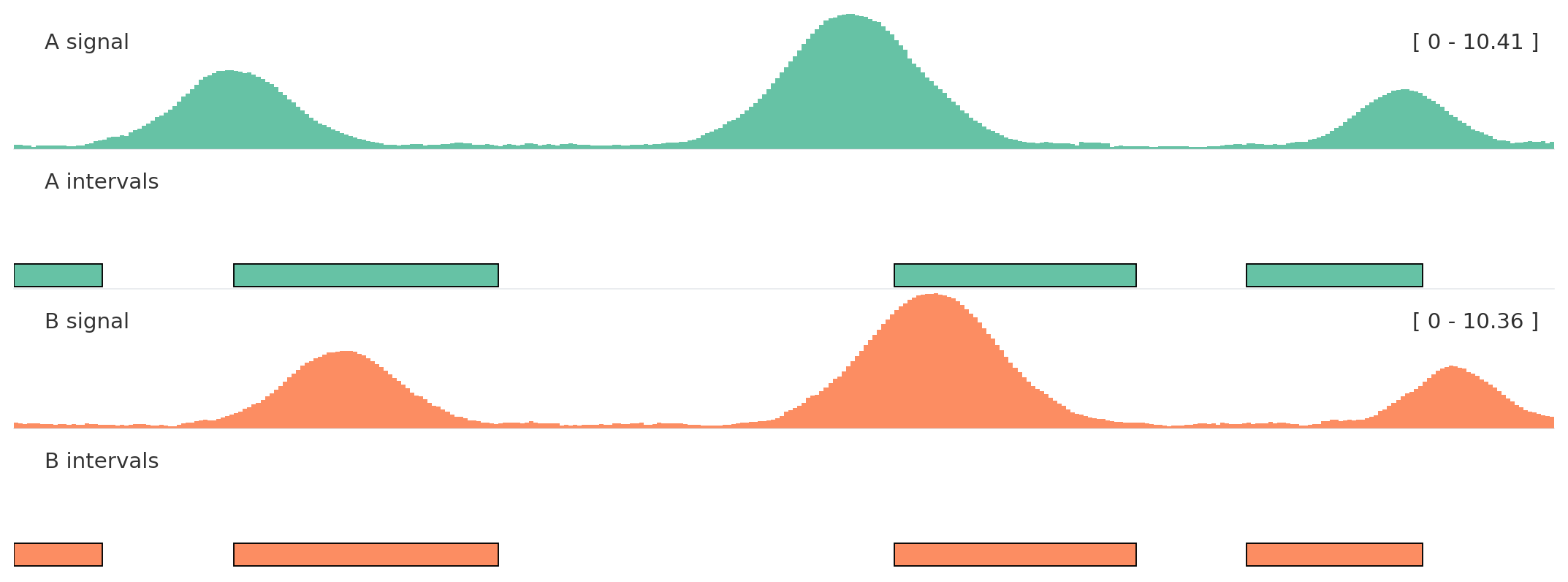
Call autocolor() once and reuse color_group for related tracks.
from plotnado import GenomicFigurefrom plotnado.examples import REGION, intervals, signal# signal() → DataFrame(chrom, start, end, value) — replace with a BigWig path/URL or DataFrame# intervals() → DataFrame(chrom, start, end, name) — replace with a BED/BigBed path, URL, or DataFramefig = GenomicFigure(track_height=1.05).autocolor("Set2")fig.bigwig(signal(phase=0.0), title="A signal", color_group="A")fig.bed(intervals(), title="A intervals", color_group="A", display="expanded")fig.bigwig(signal(phase=1.2), title="B signal", color_group="B")fig.bed( intervals().assign(name=["b1", "b2", "b3", "b4"]), title="B intervals", color_group="B", display="expanded",)fig.plot(REGION)
Use helper methods such as fig.bigwig(...) and fig.bed(...) for most work.
Use fig.add_track(alias, ...) when track type names come from config.
Use explicit track classes when a larger pipeline needs to validate or pass track objects.
from plotnado import GenomicFigureGenomicFigure.available_track_aliases()GenomicFigure.track_options("bigwig")GenomicFigure.track_options_markdown("genes")
Validate input assumptions early
Confirm chromosome naming is consistent (chr1 vs 1).
Check that the plotted region overlaps the input data.
Keep genome versions consistent across signals, intervals, and genes.
Automate quality checks
uv run pytest tests/uv run python examples/run_examples.pyQUARTO_PYTHON=.venv/bin/python quarto render
Example scripts in examples/ are useful regression fixtures for plotting behavior.